All about Yara “The pattern matching swiss knife for malware researchers (and everyone else)” (Virustotal., 2020)
With such a fitting quote, Yara can identify information based on both binary and textual patterns, such as hexadecimal and strings contained within a file.
Using a Yara rule is simple. Every yara command requires two arguments to be valid, these are:
- The rule file we create
- Name of file, directory, or process ID to use the rule for.
$ yara myrule.yar somedirectory
Yara Rules
Anatomy of a Yara Rule
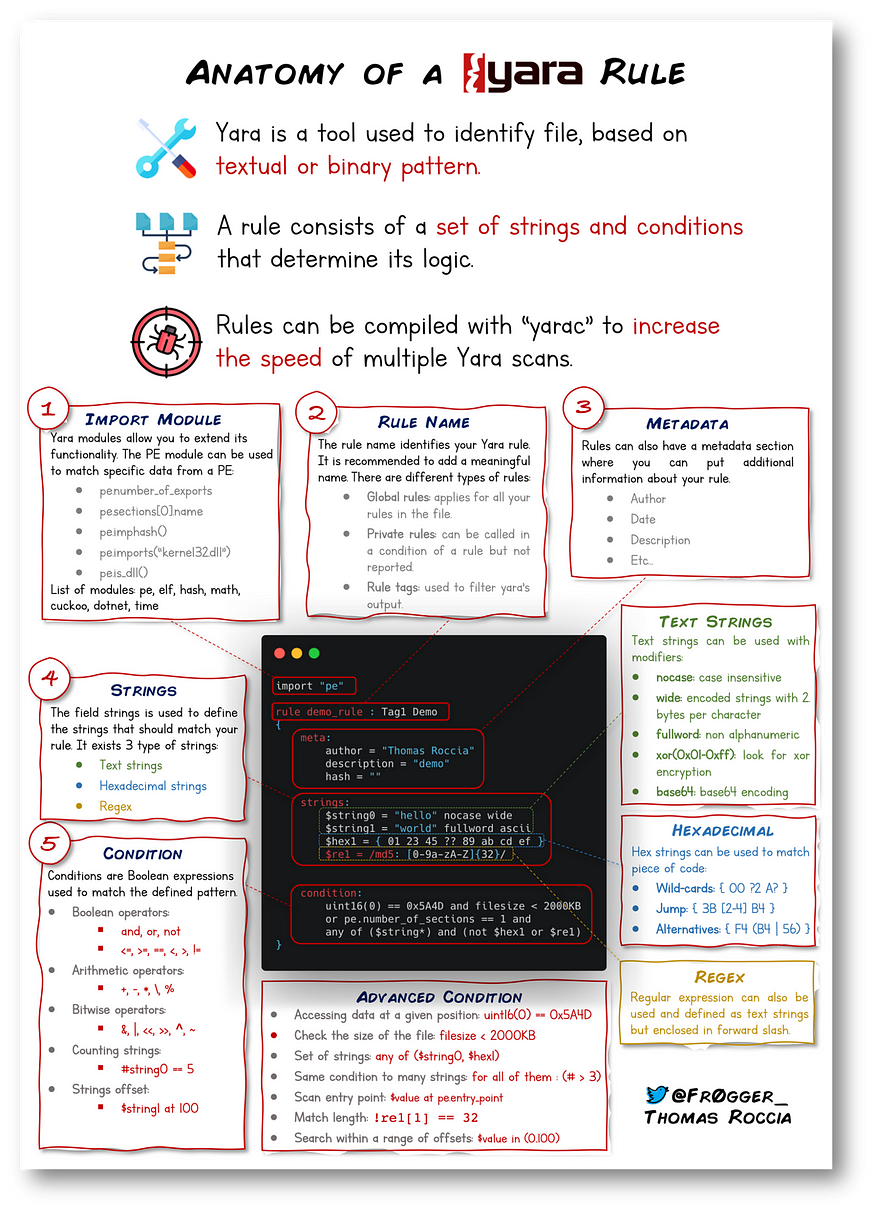
Strings
Single string
rule helloworld_checker{
	strings:
		$hello_world = "Hello World!"

	condition:
		$hello_world
}
Any string
rule helloworld_checker{
	strings:
		$hello_world = "Hello World!"
		$hello_world_lowercase = "hello world"
		$hello_world_uppercase = "HELLO WORLD"

	condition:
		any of them
}
Conditions
We have already used the true and any of them condition. Much like regular programming, you can use operators such as:
<= (less than or equal to)
>= (more than or equal to)
!= (not equal to)
For example, the rule below would do the following:
rule helloworld_checker{
	strings:
		$hello_world = "Hello World!"

	condition:
        $hello_world <= 10
}
The rule will now:
- Look for the “Hello World!” string
- Only say the rule matches if there are less than or equal to ten occurrences of the “Hello World!” string
Combining keywords
Moreover, you can use keywords such as:
and
not
or
rule helloworld_checker{
	strings:
		$hello_world = "Hello World!"

        condition:
	        $hello_world and filesize < 10KB
}
resorces
LOKI
LOKI is a free open-source IOC (Indicator of Compromise) scanner created/written by Florian Roth.
Based on the GitHub page, detection is based on 4 methods:
File Name IOC Check
Yara Rule Check (we are here)
Hash Check
C2 Back Connect Check
There are additional checks that LOKI can be used for. For a full rundown, please reference the GitHub readme.
LOKI can be used on both Windows and Linux systems and can be downloaded here.